• Tech Geek and More – Contact
  • Tech Geek and More – Privacy Policy
TGM
  • Home
  • News
  • How To
  • Social Media
    • Facebook
    • Instagram
    • WhatsApp
    • Twitter
  • Hardware
  • Software
    • Android
    • Apple
    • Microsoft
    • Browser
    • Recommended
  • The Web
    • Data Breach
    • Deals – Free / Cheap
    • Hacking
    • Live Streams
    • Network Security
    • Online Shopping
      • Amazon
      • Groupon
      • Living Social
      • Walmart
      • Woot
    • Privacy
    • Security
    • Scams
    • Virus And Malware Help
  • Gaming
    • Xbox
    • Nintendo
    • PlayStation
    • ELEAGUE
    • E3
  • And More
No Result
View All Result
  • Home
  • News
  • How To
  • Social Media
    • Facebook
    • Instagram
    • WhatsApp
    • Twitter
  • Hardware
  • Software
    • Android
    • Apple
    • Microsoft
    • Browser
    • Recommended
  • The Web
    • Data Breach
    • Deals – Free / Cheap
    • Hacking
    • Live Streams
    • Network Security
    • Online Shopping
      • Amazon
      • Groupon
      • Living Social
      • Walmart
      • Woot
    • Privacy
    • Security
    • Scams
    • Virus And Malware Help
  • Gaming
    • Xbox
    • Nintendo
    • PlayStation
    • ELEAGUE
    • E3
  • And More
No Result
View All Result
TGM
No Result
View All Result

Mac OS 11 Is Finally Here

Alex by Alex
August 29, 2026
Home Software Apple
Share on Facebook
Share on Twitter

Apple retires macOS X after almost 20 years and releases macOS 11 (Big Sur)

For all of you Mac pc/laptop users, macOS 11 is finally here. Just short of the 20-year mark, Apple has now officially retired macOS X and brought you macOS Big Sur (version 11.0.1). Today’s post will give you just some of what you can expect with updating to the latest version of the macOS. Mac OS 11 Is Finally Here


Brief History of the macOS Operating System 

On Sep. 13th, 2000 Apple released a public beta version of its new OS X software. This beta version was the preview of what was to come and was used to gain feedback from the user base. Funny enough the users who got the beta version paid $29.95 to buy it, and the beta version stopped working after the first full version of OS X was released on March 24th, 2001. Including the initial full release, there were 16 versions of macOS X that were released over 19 1/2 years.  To many, the release of version 11 of the macOS came as a surprise as OS X just appeared to be the brand identity for the pc/laptop software from Apple.
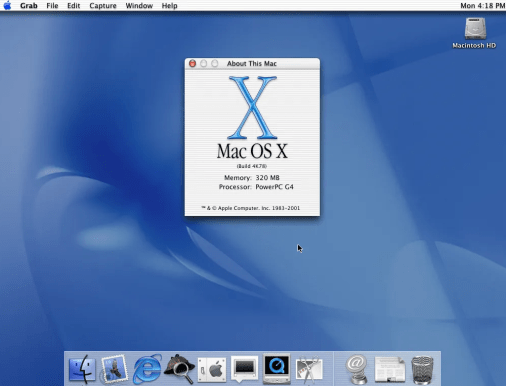
macOS X Cheetah


For Those Who Want To Get The Update 

If you want to update your machine, and you haven’t received the prompt to update yet, you can take the following steps.

  • Go into System Preferences
  • Select Software Update

When you go into Software Updates, you will see the window show that the system is Checking for Updates.

checking for updates


Once the system completes checking for updates, you will get the prompt for the update. If you are ready just click Upgrade Now.

macOS Big Sur Download


Here are a few things about the upgrade to keep in mind.

  • The upgrade is 12.18 GB in size. That is just the download file, so you better make sure you have at least double that amount of space free on the hard drive before doing this update.
  • Once you click on the upgrade now, leave the window open in the background. We noticed in our upgrade that if you close the window, the upgrade download stops and you will have to start over with the download when you reopen the window.
  • Connected wirelessly on a 100MB speed internet service took about 20 min to complete the download part
  • As long as you leave the software update window open in the background, you will be able to continue using your machine.

macOS Big Sur Install


Once the download is complete, you will get the prompt to start the install. Once you start the install you will lose the ability to use your machine for about about 30 min (yes the prompt says 15 min I know), if you have a higher-end pc/laptop.  Once the upgrade is completed, if you go to About This Mac you will see

OS Big Sur


So What Is Different In macOS Big Sur 

If we are going from OS X to OS 11, you have to assume there are some BIG changes in store for the operating system. Here is what we see so far.

  • Reworking of how apps and screens appear. Toolbars look a bit different, and the changes are supposed to “make it easier to get work done”
  • The Control Center feature that iOS users have been accustomed to is now part of macOS as well. Control Center access to volume, brightness, wi-fi, Bluetooth among its many features. If there is a control function that you use regularly, you can drag it from the control center, and move it into the top menu bar.

macOS CPanel


  • Also, you get an updated notification center, updated Safari, and new features in Messages that include being able to pin important conversations.

Final Thought 

Can’t really give a final thought to macOS 11 yet, since we just started taking it for a spin, but so far it is looking it’s off to a good start.

Source(s) 

  • Wikipedia – macOS History Information


Share this:

  • Share on Facebook (Opens in new window) Facebook
  • Print (Opens in new window) Print
  • Share on LinkedIn (Opens in new window) LinkedIn
  • Share on Reddit (Opens in new window) Reddit
  • Share on Pinterest (Opens in new window) Pinterest
  • Share on Tumblr (Opens in new window) Tumblr
  • Share on Telegram (Opens in new window) Telegram
  • Share on WhatsApp (Opens in new window) WhatsApp
  • Email a link to a friend (Opens in new window) Email
  • Share on X (Opens in new window) X

Like this:

Like Loading…
Tags: AppleBir SurHow ToLaptopMacmacOSmacOS 11OSOS XPc
Alex

Alex

30 years of professional experience with technology. Experience with technology implementation and systems management at numerous 5 Star Hotels, and Stadiums across North America. Head of Tech Geek and More since 2009

Related Posts

How To
Apple

How To: Opting Out Of Apple Analytics

September 13, 2026
News
Latest Post

News: YouTube TV Removing Channels

September 12, 2026
How To
Apple

How To: Requesting Access As Apple Legacy Contact

September 9, 2026
Next Post
news

News: FTC Zoom Settlement

Leave a ReplyCancel reply

This site uses Akismet to reduce spam. Learn how your comment data is processed.

TGM Logo

Search

No Result
View All Result

Support Tech Geek and More (Via PayPal)

For those who wish to donate to TGM, just click this link. It will take you to our TGM Paypal page. 

iDrive Online Backup (AD)

Authorized Reseller

Recent Posts

  • How To: Opting Out Of Apple Analytics
  • News: YouTube TV Removing Channels
  • How To: Requesting Access As Apple Legacy Contact
  • How To: Set Up Legacy Apple Account
  • Alert: Zoom Services Reporting Issues (Resolved)

Recent Comments

  • Marlize on Nintendo Reporting Unauthorized Login to “Nintendo Network ID”
  • anovelo on How to resolve SD Card issues (For Windows and Mac)
  • Lucas bray on How to resolve SD Card issues (For Windows and Mac)
  • faith atienza on How to resolve SD Card issues (For Windows and Mac)
  • francesc on Getting the Iomega USB floppy drive working on newer Windows OS

Categories

Archives

Calendar

September 2026
M T W T F S S
 123456
78910111213
14151617181920
21222324252627
282930  
« Jan    
Facebook Twitter Pinterest RSS

Tags

2FA alert Amazon android Apple Best Buy breach Data Breach Deal Deal Alert Deal of the Day Facebook FB Gaming Google Hacking How To Instagram iOS iPad iPhone Mac macOS Microsoft MS News outage Sale Scam security social media Software T-Mobile Tech Tech Geek and More TGM Twitter two factor authentication Web Windows Windows 10 Xbox Xbox Game Pass xbox live YouTube

Pages

  • Tech Geek and More – Privacy Policy
  • About Tech Geek and More
  • Tech Geek and More – Contact

TGM Categories

TGM Archives

RSS feed: TGM RSS TGM RSS

  • How To: Opting Out Of Apple Analytics
    Concerns You Should Have With Data Collection People don’t realize how much of their data is collected by BIG TECH companies.  In most cases, tech companies have their settings automatically set to on (opt in), and it’s up to the end user to find and turn the settings off (opt out). This post will review […]
  • News: YouTube TV Removing Channels
    YouTube TV Removing Channels From Its Lineup YouTube TV has notified subscribers that it will be removing 3 channels from its lineup as of September 30, 2026. Today’s post will go over the announcement. What Is Being Removed  According to the announcement released by YouTube TV, they will be removing Court TV The Young Turks […]
  • How To: Requesting Access As Apple Legacy Contact
    As An Apple Legacy Contact Being a Legacy Contact is the most secure way for someone to give you access to the data stored in their Apple Account after their death. In a previous TGM post, we reviewed How To Set Up a Legacy Apple Account. In this post, we will review what you need […]

© 2009 - 2026 TGM - Tech Geek and More - Making Technology Easy TGM.

Manage Consent
To provide the best experiences, we use technologies like cookies to store and/or access device information. Consenting to these technologies will allow us to process data such as browsing behavior or unique IDs on this site. Not consenting or withdrawing consent, may adversely affect certain features and functions.
Functional Always active
The technical storage or access is strictly necessary for the legitimate purpose of enabling the use of a specific service explicitly requested by the subscriber or user, or for the sole purpose of carrying out the transmission of a communication over an electronic communications network.
Preferences
The technical storage or access is necessary for the legitimate purpose of storing preferences that are not requested by the subscriber or user.
Statistics
The technical storage or access that is used exclusively for statistical purposes. The technical storage or access that is used exclusively for anonymous statistical purposes. Without a subpoena, voluntary compliance on the part of your Internet Service Provider, or additional records from a third party, information stored or retrieved for this purpose alone cannot usually be used to identify you.
Marketing
The technical storage or access is required to create user profiles to send advertising, or to track the user on a website or across several websites for similar marketing purposes.
  • Manage options
  • Manage services
  • Manage {vendor_count} vendors
  • Read more about these purposes
View preferences
  • {title}
  • {title}
  • {title}
No Result
View All Result
  • Home
  • News
  • How To
  • Social Media
    • Facebook
    • Instagram
    • WhatsApp
    • Twitter
  • Hardware
  • Software
    • Android
    • Apple
    • Microsoft
    • Browser
    • Recommended
  • The Web
    • Data Breach
    • Deals – Free / Cheap
    • Hacking
    • Live Streams
    • Network Security
    • Online Shopping
      • Amazon
      • Groupon
      • Living Social
      • Walmart
      • Woot
    • Privacy
    • Security
    • Scams
    • Virus And Malware Help
  • Gaming
    • Xbox
    • Nintendo
    • PlayStation
    • ELEAGUE
    • E3
  • And More

© 2009 - 2026 TGM - Tech Geek and More - Making Technology Easy TGM.

Go to mobile version
%d